Workflow Automation
Turn repeatable multi-step work into structured workflows that move automatically from intake through completion.

CONNECTED SYSTEMS. REAL PROGRESS.
We build connected business systems, workflow automation, integrations and SaaS products that turn repetitive, disconnected work into automated operations.
AUTOMATERepetitive work
CONNECTData and systems
SURFACEExceptions
EMPOWERYour teams
The friction often lives between systems: employees copy information, compare reports, chase status, re-enter data, send updates, and decide what needs attention.
Teams repeatedly compare files to determine what changed, matched, or failed.
People search across systems, emails, and reports just to understand current status.
The same information is copied between tools because the systems are disconnected.
Employees apply the same predictable rules to routine cases again and again.
Work waits for messages, approvals, confirmations, and manual follow-up.
Problems surface after they have already delayed the workflow.
We start with how the work actually happens, then build the system needed to connect it, automate it, and make exceptions visible.
Purpose-built operating systems that connect people, data, workflow, status, and decisions.
Routine steps execute automatically while exceptions move to the right person.
Connect applications, databases, APIs, business files, and existing software.
Turn business activity into current status, decisions, alerts, and actionable exceptions.
Focused applications for workflows where generic software doesn't fit the operating process.
Repeatable software products built around recurring operational problems shared across companies.
The goal is not to remove people from the business. It is to remove repetitive work from people.
Systems, files, people and data.
Structure the workflow and business rules.
Execute predictable routine work.
Track status as the work moves.
Detect exceptions requiring attention.
Bring judgment to the right person.
Resume and update connected systems.
Once the operating model is clear, PivotNext systems can integrate data, apply business rules, reconcile records, route exceptions, and give teams live operational visibility—without removing the human judgment that matters.
Turn repeatable multi-step work into structured workflows that move automatically from intake through completion.
Connect spreadsheets, files, applications, databases, and operational tools so teams work from a shared flow of information.
Move, normalize, validate, and synchronize business data between the systems and processes that depend on it.
Compare records across sources, identify matches and discrepancies, and surface the records that require review.
Apply defined business rules consistently so routine decisions can happen automatically and predictably.
Keep normal work moving while routing unusual conditions, conflicts, and approvals to the appropriate person.
Bring status, progress, dependencies, and exceptions into focused dashboards that show what is happening now.
Build purpose-designed software for recurring operational workflows that generic tools and disconnected spreadsheets cannot handle well.
Automate predictable work while preserving human review for approvals, judgment calls, and high-value exceptions.
PivotNext begins by understanding how work actually moves today— the people, systems, files, handoffs, decisions and exceptions—then designs the connected system around that reality.
Observe the current workflow, systems, people, inputs, outputs and recurring manual work.
Identify duplicated effort, disconnected information, delays, handoffs, decision points and late exceptions.
Define what should connect, what should automate, what needs visibility and where people should stay in control.
Develop the business application, workflow automation and connections around the approved operating model.
Introduce the system into the operation, measure how the workflow performs and evolve it as the business changes.
PivotNext applies the same operating-system thinking across logistics, retail and medical practice operations. The industry changes, but the friction is familiar: disconnected information, repetitive work, manual handoffs and exceptions that surface too late. Each project turns that operational reality into a clearer connected system.
Explore an interactive, vendor-neutral demonstration connecting manufacturing, warehouse inventory, quality, shipping and exceptions using fictional data.
Centralizes sales, inventory, suppliers, purchasing, expenses, employees, reporting and business settings.
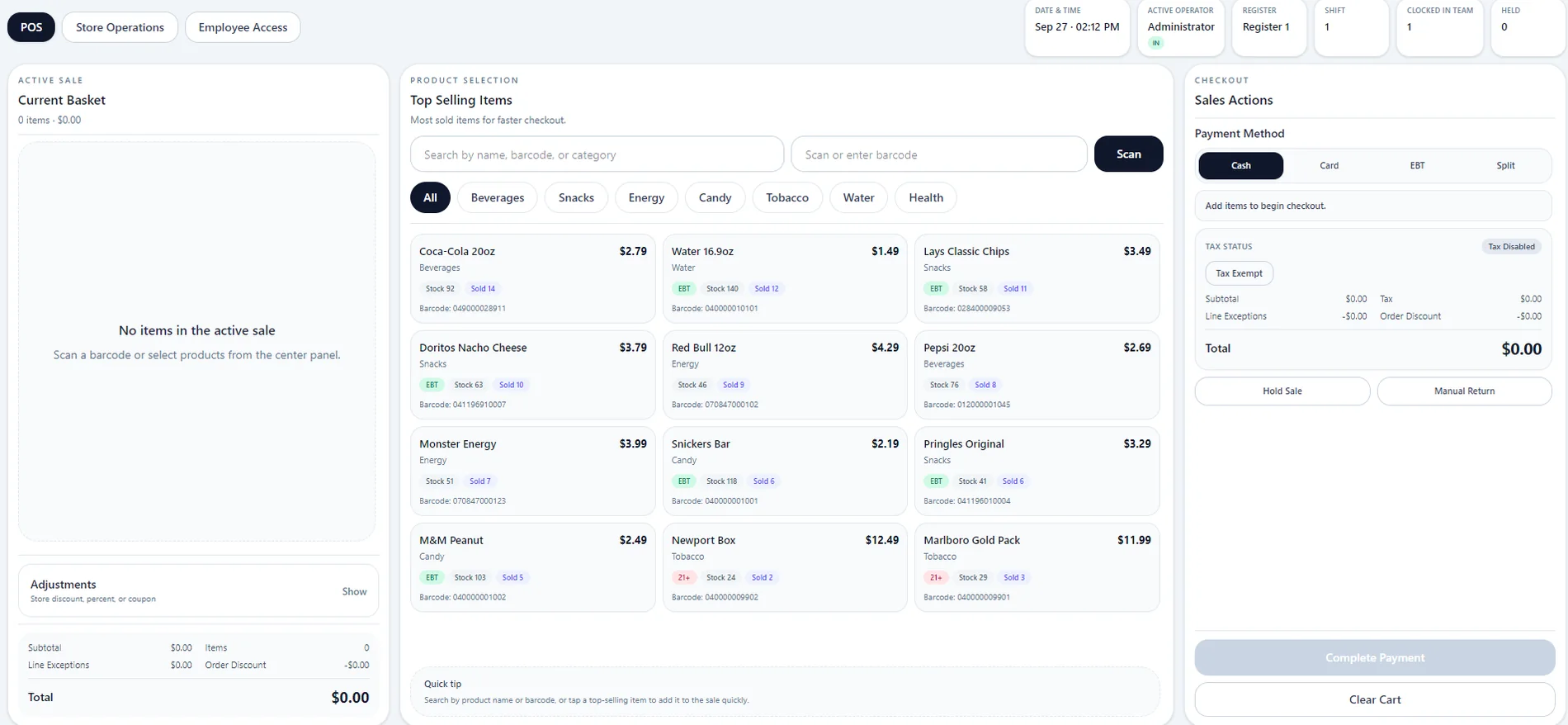
Designed around product selection, barcode entry, active basket management, payment options, shift context and fast checkout.
Connects scheduling, intake, live patient flow, visit coordination, billing, communications and follow-up in one practice workspace.
Explore how manufacturing, warehouse inventory, quality, shipping and operational exceptions can be connected in one command center. This independent showcase uses fictional demonstration data.
Open warehouse showcase →The Retail Operations Dashboard brings the administrative side of the store into one structured system—giving owners and managers a clearer view of sales, stock, purchasing, expenses, suppliers, employees and business performance.
The frontline POS interface is designed for high-frequency convenience-store transactions. Cashiers can move from product search or barcode entry to basket management and payment without leaving the core checkout view.
PivotNext Medical coordinates the operational side of a medical practice in one workspace. It connects scheduling, intake and check-in, live patient flow, visit coordination, billing and claims, communications, follow-up work, staff workload, reporting and automation—while keeping important exceptions visible to the people who need to act on them.
PivotNext approaches business systems as operating infrastructure. The interface matters, but so do the workflow, permissions, handoffs, exception paths, connected data and the people who depend on the system every day.
Start with how work is actually performed—across people, tools, files, handoffs and exception paths.
Consider access, integrations, operational reliability and how the system fits into the environment it will serve.
Automate predictable work while preserving human review for approvals, judgment calls and high-value exceptions.
Begin with the workflow creating the most friction, then extend the connected system as the operation matures.
A demo may begin with a file, click or manual action. A real PivotNext system connects to the source, applies the workflow continuously and brings people in when judgment or exceptions require them.
Tell us where work is repetitive, disconnected, or dependent on manual follow-up. We’ll look at how the workflow could be connected, automated, or redesigned.